Purpose
Payors can now choose to receive a payment as a paper check when accepting it in Built. Previously, payments could only be received by bank deposit, which required a linked bank account. When a check is selected, no bank account is needed. Users add a mailing address and choose how quickly they want the check delivered.
Key Features
Check as a payment option: When accepting a payment, users choose between Bank deposit and Check.
No bank account required: Users receiving a check do not need to link a bank account. Instead, they add a mailing address as a check destination.
Two check delivery speeds: Standard mail or the faster Express courier.
Delivery estimate: After a payment is accepted, the payment detail screen shows an estimated delivery time.
Target Users
Payors and vendors who receive payments through Built.
How It Works
From the Receivables page, click Accept Payment in the banner or in the Actions column for the invoice.
Under How would you like to receive your payment?, select Check.
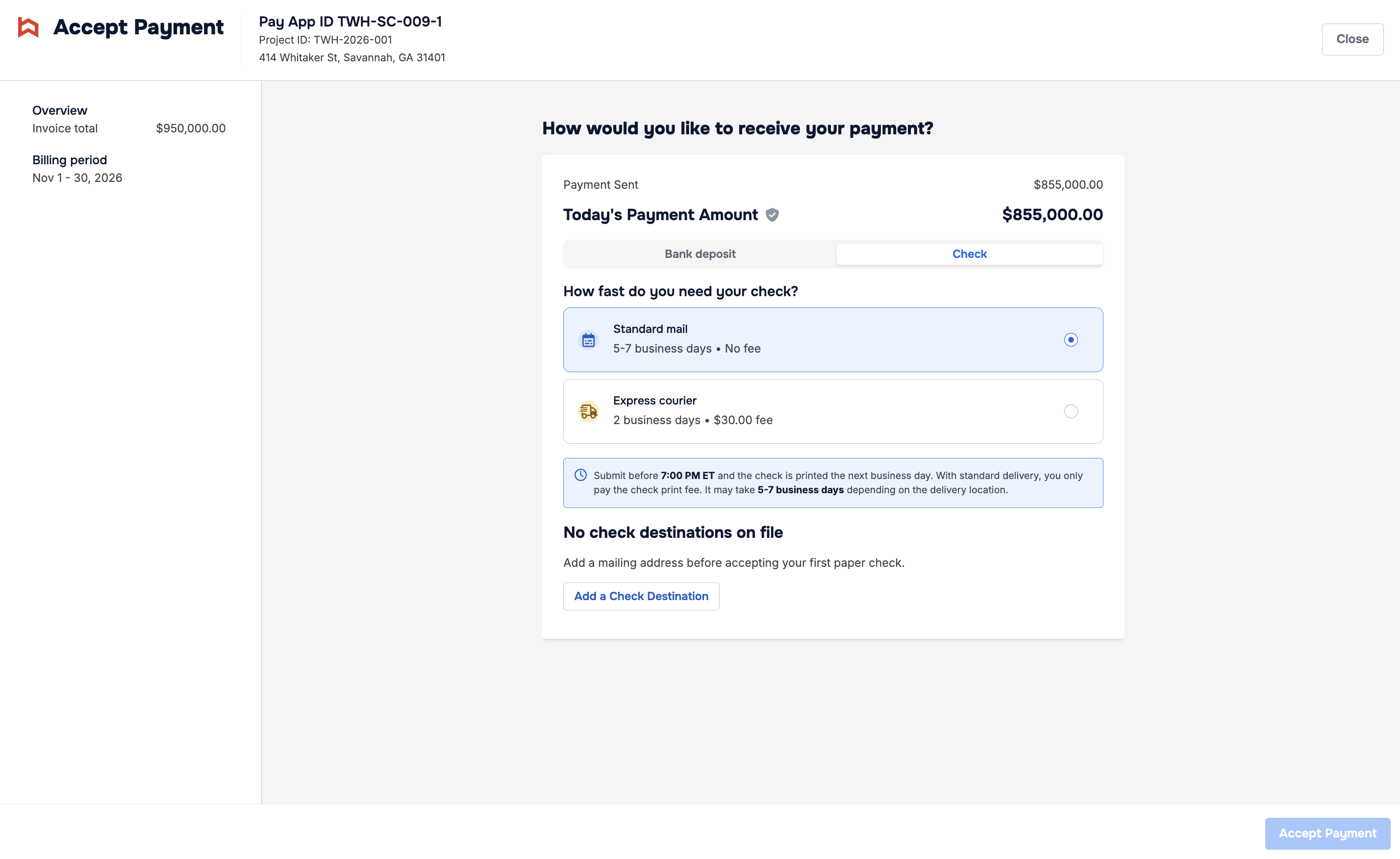
Under How fast do you need your check?, select a delivery option:
Standard mail: Check fee only.
Express courier: Faster delivery for an additional fee.
Select a mailing address from the Check Destination dropdown. If no mailing address is on file, click Add a Check Destination and add one.
Click Next.
If a lien waiver is required, review and sign it.
Review the payment details, then click Accept Payment.
Note:
A check fee applies to all check payments and is deducted from Today's Payment Amount.
To receive the payment by bank deposit instead, select Bank deposit. A linked bank account is still required for bank deposits.
Delivery Timing
Timing depends on the delivery option selected when the payment is accepted.
Payment Method | Delivery Option | Typical Timing |
|---|---|---|
Bank deposit | Immediate | Typically reflected in your account within minutes |
Bank deposit | By next business day | Can take 1 to 3 business days to be reflected in your account |
Check | Standard mail | 5 to 7 business days on average |
Check | Express courier | 1 to 2 business days |
Note:
The payment detail screen shows an estimate after the payment has been accepted.
Benefits
Accept payments without linking a bank account.
Choose the payment method and delivery speed that fit your needs.
FAQ
Do I need a bank account to accept a payment by check?
No. A bank account is only required for bank deposits. To receive a check, add a mailing address using Add a Check Destination.
How long does it take to receive a check?
Checks sent by Standard mail take 5 to 7 business days on average. Express courier is available for delivery in 1 to 2 business days for an additional fee.
Where can I see when my payment will arrive?
After the payment has been accepted, the payment detail screen shows an estimate.